Start11 Version 3.0 BETA 1b

Taskbar resizing from Medium to Small does not stick

Windows Version Number: Microsoft Windows Version 26H2 (OS Build 26300.9818)
App Version: 3.0 BETA 1b

In my installation, changing the Taskbar size from Medium to Small does change the size, but only for a couple of seconds. Then it changes back.

674 views 9 replies
Reply #1 Top

Hello,
Sorry to hear you are having issues. I tried on my system, and I can't reproduce your issue. Perhaps installation issue, first, to make sure it get install properly. Please try, uninstall Start11, reboot immediately (important), download latest version available in your account product download page: https://store.stardock.com/myaccount/products. Install it, reboot immediately again. Retest it and report back.

Thank you,
Basj,
Stardock Community Assistant.

Reply #2 Top

Hi Basj.

Thank you for your response. I did those things you suggested, but it hasn't cured the problem.

I'm attaching 3 screenshots. 

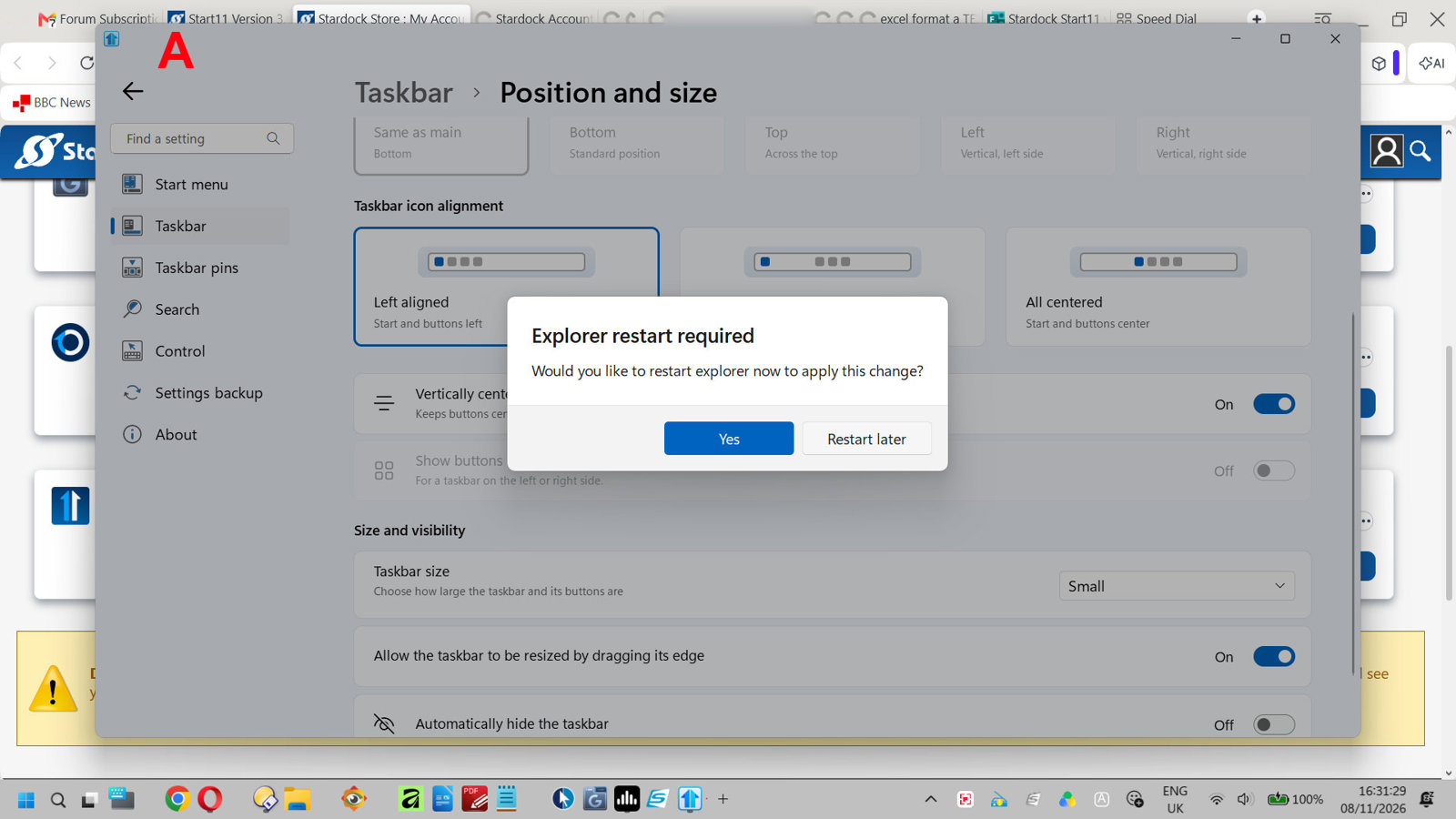
The one labelled A shows the point where I have requested a Small taskbar size and am invited to restart Explorer. I click Yes.

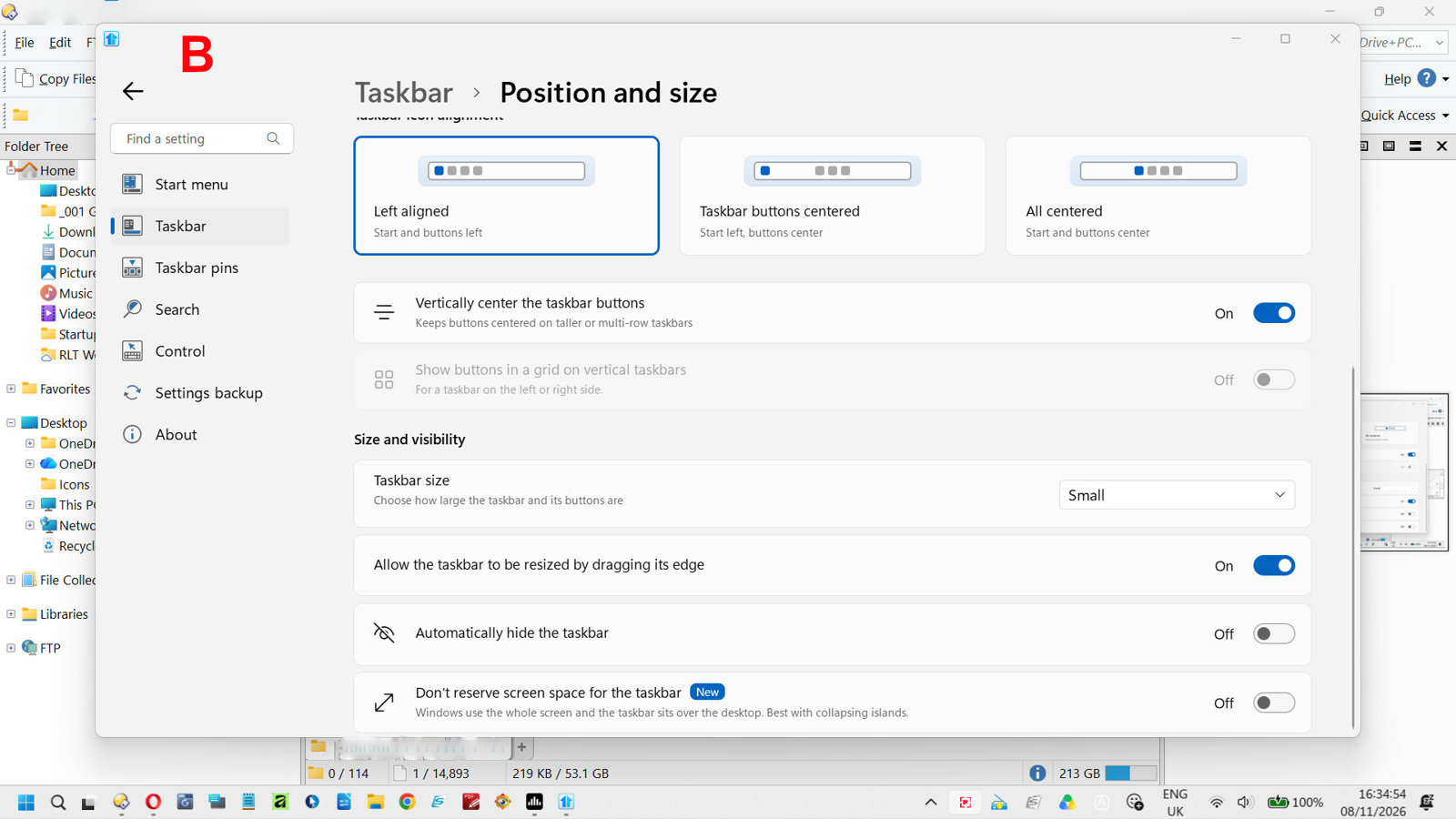
The one labelled B shows the screen immediately* after the Explorer restart. You'll see a smaller taskbar and smaller icons at the bottom. The icons' order has also mysteriously changed.

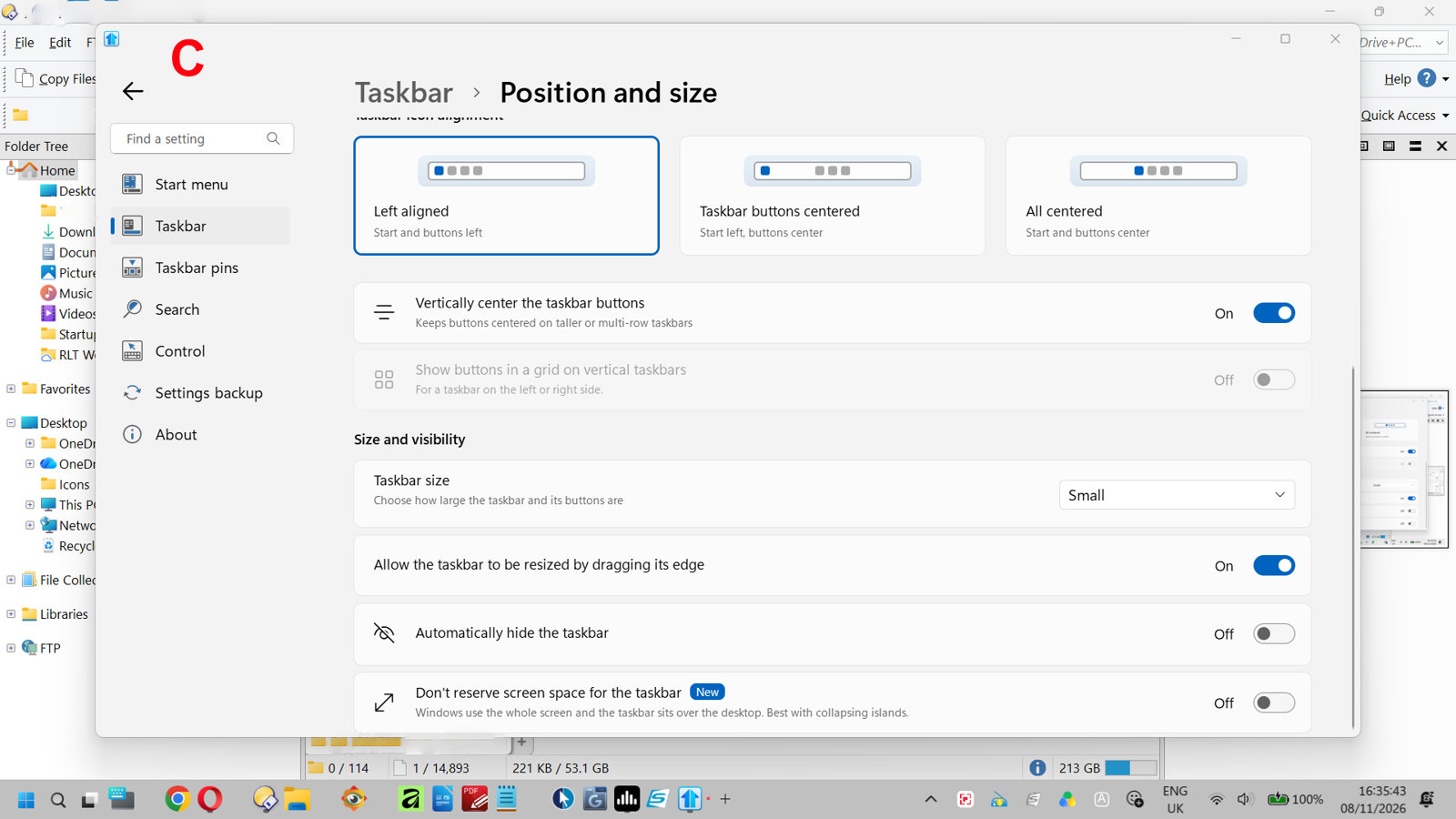
The one labelled C shows the screen a few seconds* later, where the taskbar and its icons have reverted to Medium size and are back in their original order, following a sudden visible and automatic change, which remains in place.

I note that you weren't able to reproduce this, but it definitely happens to me. I think there must be a bug lurking here.


* The times shown in the screen-grabs do not indicate actual time delays, but the times at which I took the screenshots. I had to reproduce the steps several times to grab the screen just at the right moment when the smaller taskbar was visible and before the automatic size reversion took place.
Reply #3 Top

I think the issue may be you have changed the taskbar icon sizes?

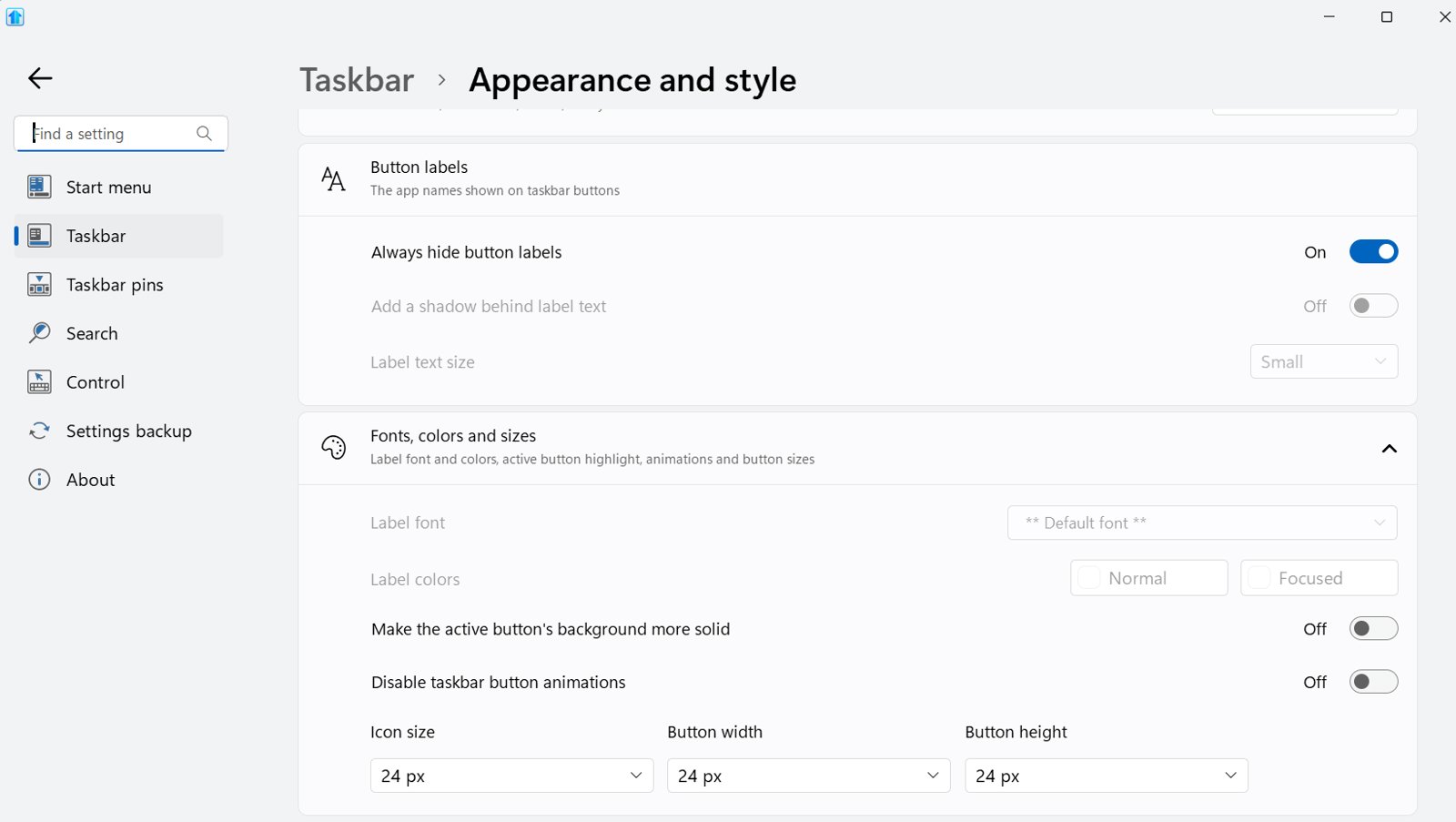
This is at the bottom of the appearance and style page.  Icon size should be set to the default of 24.

Reply #4 Top

Neil, thank you very much for your suggestion. I have tried applying the 24 px size (my settings were indeed larger) to all 3 button parameters (see new screenshot), but the problem remains.

Reply #5 Top
Quoting PatrickOfLondon, reply 4149796

Neil, thank you very much for your suggestion. I have tried applying the 24 px size (my settings were indeed larger) to all 3 button parameters (see new screenshot), but the problem remains.

End of PatrickOfLondon's quote

You need to pick it when it says default. For all three items.  It is the top choice in all three.  Otherwise it will use the size you specified instead of the adjusted size.

Reply #6 Top

I don't know if someone noticed this, but added to the awful mess of the icons move in this beta (the last update didn't really solved that.. it's still awfully painful (don't have time to post the video I filmed while using it , will do it next time).
Painful ? yes, i'm a both hands disabled person, so now, using Start11 hurt my hands just to have an "acceptable" start menu to use, as it need extra click and clicking longer just to have an icon being almost where i want...

but then i noticied all day that my Cpu (i7-7700) was all the time at 30%.. even by doing nothing..
After investigation, the faulty was iwidgets.host in the task manager. killing it, and it was coming back immediately. the only way I found for now is to rename widgets.hosts.exe in the program folder to .bak and kill it in the task manager... and now the cpu is back as normal, between 1 and 5%...

I hope it's not a "feature", a new "improvement", or "your cpu is not powerful enough"...
good bye widgets... so what's the point of this version ? getting back to v2 ?

Reply #7 Top
Quoting martyprod, reply 4149806

I don't know if someone noticed this, but added to the awful mess of the icons move in this beta (the last update didn't really solved that.. it's still awfully painful (don't have time to post the video I filmed while using it , will do it next time).

Painful ? yes, i'm a both hands disabled person, so now, using Start11 hurt my hands just to have an "acceptable" start menu to use, as it need extra click and clicking longer just to have an icon being almost where i want...


but then i noticied all day that my Cpu (i7-7700) was all the time at 30%.. even by doing nothing..

After investigation, the faulty was iwidgets.host in the task manager. killing it, and it was coming back immediately. the only way I found for now is to rename widgets.hosts.exe in the program folder to .bak and kill it in the task manager... and now the cpu is back as normal, between 1 and 5%...


I hope it's not a "feature", a new "improvement", or "your cpu is not powerful enough"...

good bye widgets... so what's the point of this version ? getting back to v2 ?

End of martyprod's quote

Which widgets were you using?

That shouldn't be the case as they are designed to be lightweight.


Reply #8 Top

Neil, thank you again for your willingness to help (reply #5).

Picking the "default" option has indeed fixed the problem.

With best wishes, Patrick

Reply #9 Top
Quoting Neil, reply 4149820
Quoting martyprod, reply 4149806

I don't know if someone noticed this, but added to the awful mess of the icons move in this beta (the last update didn't really solved that.. it's still awfully painful (don't have time to post the video I filmed while using it , will do it next time).

Painful ? yes, i'm a both hands disabled person, so now, using Start11 hurt my hands just to have an "acceptable" start menu to use, as it need extra click and clicking longer just to have an icon being almost where i want...


but then i noticied all day that my Cpu (i7-7700) was all the time at 30%.. even by doing nothing..

After investigation, the faulty was iwidgets.host in the task manager. killing it, and it was coming back immediately. the only way I found for now is to rename widgets.hosts.exe in the program folder to .bak and kill it in the task manager... and now the cpu is back as normal, between 1 and 5%...


I hope it's not a "feature", a new "improvement", or "your cpu is not powerful enough"...

good bye widgets... so what's the point of this version ? getting back to v2 ?

End of martyprod's quote

Which widgets were you using?

That shouldn't be the case as they are designed to be lightweight.


End of Neil's quote

I used the feed one, with a french information rss feed, but it was not nice because the widget has a limited width so we see a very partial headlines, a bit useless.
i added the clock (compact) and the reminder (for Xmas or new year). I tested as well the hard disc space one.
so the 3 or 4 at the same time was using too much Cpu. i'll do a test to see if it's the same for using only one.
It's not a big deal.
but if it's possible to make the icons move a bit much better than it is actually, and stopping having the icons to break the group each time we want to just move one, that would be great... It's a much more important fonction than any of the widgets.
thanks.