

Newly pasted files do not align after the last icon on the desktop

Hello,

I am using Stardock Fences. When I copy or paste a new file onto the desktop, it gets hidden behind my existing Fences instead of being positioned immediately after the last icon on the desktop. I have to move the Fence manually to see the new file. This used to work perfectly for years without any issues.

Please provide a solution or configuration setting to restore the default behavior where new files appear properly outside or after the Fences.

Thank you.
222 views 4 replies
Reply #1 Top

Hello,
Sorry to hear you are having issues. Need to know few details.

  1. Fences full version number.
  2. Windows full version and OS Build number. Use Winver.exe to get these numbers.

    Thank you,
    Basj,
    Stardock Community Assistant.
Reply #2 Top

Hi, yes we've been unable to reproduce this but are happy to look into it further.

Possible paste provide a screenshot?

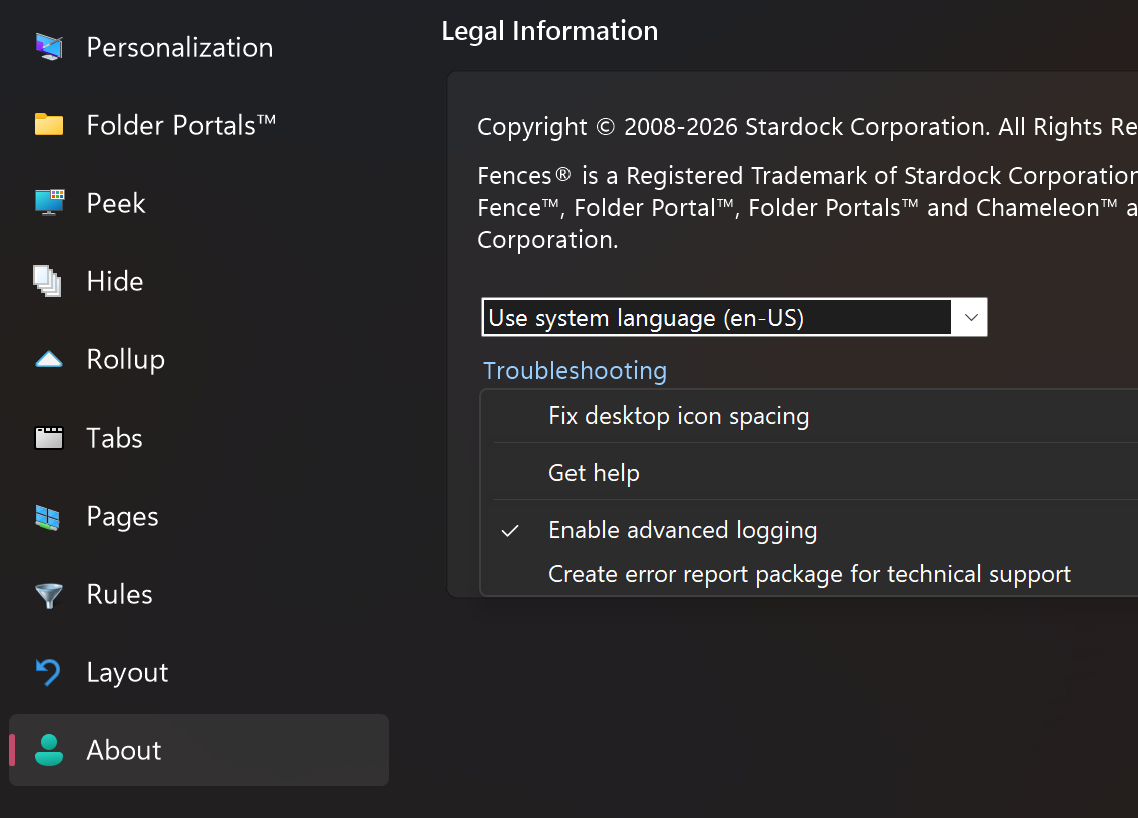
Similarly, if you could capture and upload a report that would help us look into it more closely. Here are the steps:

(1) In About, choose Troubleshooting and "Enable Advanced Loggin".
(2) Reboot, then reproduce the problem so that it's captured in the log
(3) Return to About → Troubleshooting, and choose "Create error report package"

Including the title icon that went to the wrong place would be helpful, for us to look into the log, as well as information about which monitor if there are multiple monitors.

Reply #3 Top

Hello, Here are the requested details: 1. Fences full version: 4.23 2. Windows full version and OS Build: Windows 11 Pro, Version 25H2 (Build 26200.9445) Thank you!

Reply #4 Top

There has been no meaningful change for v4 for a very long time (~3 years), so I’m wondering what else has changed on your system.

I recommend trying out the trial of newer versions for latest Windows compatibility fixes. The subscription is more expensive than you’re used to, but if it fixes your issue, it’s because we are able to keep up with compatibility maintenance and other larger improvements over time with this annual model which keeps you up to date. Hope the updates are able to help